
How many apps does it take to write one novel? For most writers, the honest answer is too many. Maybe you're deep in a fantasy trilogy, maybe you're outlining your first romance, or maybe you have forty half-finished chapters and a folder called "FINAL_v7_actualfinal."
Whatever stage you're at, your writing setup probably looks something like this: one app for drafting, one for character notes, one for inspiration, one for formatting the finished book, and one to hold the whole system together. Five apps, five logins, five places your story lives.
It feels normal because almost every writer does it. But normal isn't the same as good for your writing. Most of these tools are great at their one job, and I'm not here to bash them. The problem is what happens when your story gets scattered across all of them.
In this post, I'll walk through the most common tools writers rely on, where each one falls short, and why the real issue is the juggling itself. At the end, I'll show you what a simpler setup can look like.
First, Why Does This Even Matter?
A novel isn't just a pile of words. It's a web of characters, relationships, places, timelines, and promises you make to the reader. In a long book, you need to remember that your heroine's scar is on her left hand, that the rival kingdom lost its heir in chapter 4, and that two characters who now hate each other once shared a secret.
That web needs to stay consistent across tens or hundreds of thousands of words. When the information lives in five different places, you become the glue. You hold everything together in your head, and every time you switch apps, you risk dropping something.
So let's look at the usual suspects.
1. Any App That Uses AI
Let's start with the biggest one, because it's about trust, not features.
More and more writing apps advertise AI: smart suggestions, AI co-writers, intelligent assistants. They sound helpful. But here's the question every writer should ask: Do you have full trust that they're not using your manuscript to train their AI?
I used to assume the answer was yes.
Why this matters
Your manuscript is unpublished, original work, possibly years of your life. If it ends up in a training set, you can't take it back. Your voice, your world, and your characters are your career, and it's reasonable to be protective of them.
What to look for
The privacy policy and terms of service. Look for phrases like "improve our services," "train our models," or "license to use your content." Vague wording is a red flag.
Opt-out versus opt-in. If data sharing is on by default and you have to hunt for a toggle to turn it off, that tells you something about the company's priorities.
A plain-language promise. The best sign is a clear statement that your work will never be used for training, not a paragraph of legal phrasing you need a lawyer to decode.
Where your data goes. Does it stay with the company, or does it get passed to third-party AI providers?
The takeaway
You don't have to avoid every tool with AI features. But before you paste your first chapter into one, read the policy. If you can't find a clear answer, treat that as a "no."
2. Google Docs
I can hear the gasps. Google Docs? The one everyone uses?
Yes, and I'll be fair: it's free, reliable, and easy to share. For typing words, it's perfectly fine. But here's something worth sitting with: It is just a document.
What about your characters, plots, relationships, and planning?
Where it falls short for novelists
Character info gets scattered. You end up with a "Characters" doc, a "Worldbuilding" doc, a "Timeline" doc, and a handful of notes in the margins. Finding your villain's eye color means scrolling, searching, and hoping you wrote it down.
No relationship mapping. Stories run on connections: rivals, lovers, family, secret alliances. A text document can't show you how a cast of twenty-four characters connects.
No built-in plot tracking. You can write an outline, but nothing links it to your actual chapters. When you change a plot point, nothing else updates.
Long manuscripts get heavy. A full novel in one file can become slow, so many writers split it into dozens of files, which creates its own mess. Privacy depends on your settings. Your work sits on someone else's servers, and cloud platforms have their own AI features. It's worth checking what's switched on in your account.
The takeaway
Google Docs is a good page. A novel is not a page. It's a living system that needs structure, and a blank document can't give you that.
3. Milanote
Milanote is lovely. If you've seen its clean, drag-and-drop boards, you know why writers are drawn to it. It's built for creative inspiration: pin images, notes, colors, and links onto a visual canvas.
It's great for moodboards. But your moodboard is here, and your manuscript is somewhere else.
The disconnect problem
Inspiration is most useful when it sits close to the work. Imagine you're writing a moody scene in a candlelit throne room. Your reference images are in Milanote, your draft is in a document, and your character notes are in a third place. You flip between tabs, lose your flow, and by the time you're back in the scene, the vibe has faded.
Other things to consider
Boards don't connect to scenes or characters. A moodboard can't tell you which chapter it belongs to or which character it represents.
Plan limits. Free tiers of most visual tools cap how much you can add, which can become a problem once a big project grows. Check current limits before you commit.
Another login, another subscription. If you eventually upgrade, that's one more recurring cost on your list.
The takeaway
Visual inspiration is valuable, but only when it's part of your writing process. If it's a separate place you have to remember to visit, it won't help you in the moment you need it.
4. Vellum
Vellum has a strong reputation, and for good reason. It produces beautiful, professional book formatting, and its interface is a pleasure to use. If you're self-publishing, you've almost certainly heard of it.
But here's the honest question: Are you willing to pay that much?
The catch
It's a premium price. Vellum has traditionally been priced well above most tools in this space. Check its current pricing, but for many writers, especially students and first-time authors, it's a serious investment.
It's a late-stage tool. Formatting happens at the end of the process, after the draft, the edits, and the revisions. You'd be paying a lot for something you might use once per book.
Platform limits. Vellum has historically been a Mac application, which leaves out many writers. Verify what's currently supported before you plan around it.
It lives outside your story. Your manuscript has to be exported and imported into it, which means yet another handoff between apps.
The takeaway
Beautiful formatting matters, but it shouldn't be the most expensive part of your workflow, and it shouldn't sit on an island away from the rest of your writing.
5. Notion
Notion is the darling of the productivity world. It's flexible, powerful, and can be shaped to do almost anything.
And that's exactly the problem. If productivity matters to you, why do you have to set up an entire system before being "productive"?
The blank canvas trap
Notion doesn't come with a writing workflow. It comes with building blocks. So you watch tutorials, download templates, design databases, link them together, and tweak the layout. Hours pass. You feel busy. You haven't written a single sentence.
Why this hurts writers specifically
Setup becomes procrastination. Organizing your writing space can feel like progress while quietly replacing the actual writing.
You're only as good as the system you built If your database structure is clumsy, every future entry is clumsy too.
It's not made for novels. You can adapt Notion for story planning, but you're bending a general-purpose tool around your needs instead of using one designed for them.
Maintenance never ends. Templates break, properties change, and you end up spending writing time managing your system.
The takeaway
The best productivity tool is the one you can start using in thirty seconds. If it takes a whole weekend to set up, it has already cost you a weekend of writing.
6. The Hidden Cost of Juggling Five Apps
Now step back and look at the pattern. None of these apps is terrible on its own. The trouble is the combination.
Five logins, five subscriptions. The costs add up quietly, and so does the mental load of keeping track of them all.
Context switching kills flow. Every time you jump from your draft to your notes to your moodboard, you pull yourself out of the story. Task switching is known to cost focus, and creative work is especially fragile. A single interruption can take a long time to recover from.
Version confusion. Which document has the latest version of your character's backstory? Did you update the timeline after you changed that plot point? When information lives in many places, mistakes sneak in.
Higher risk of lost work. More apps mean more places where something can go unsynced, get deleted, or simply be forgotten.
Scattered privacy. Your story is spread across multiple companies, each with its own data policy. To be safe, you'd have to read and trust every single one.
A fragmented story. Characters, plot, and setting are supposed to be connected. When they live in separate tools, nothing connects them except your memory.
This is the real reason I wrote this post. It isn't that these apps are bad. It's that your story is one thing, and it deserves one home.
7. What a Better Setup Looks Like
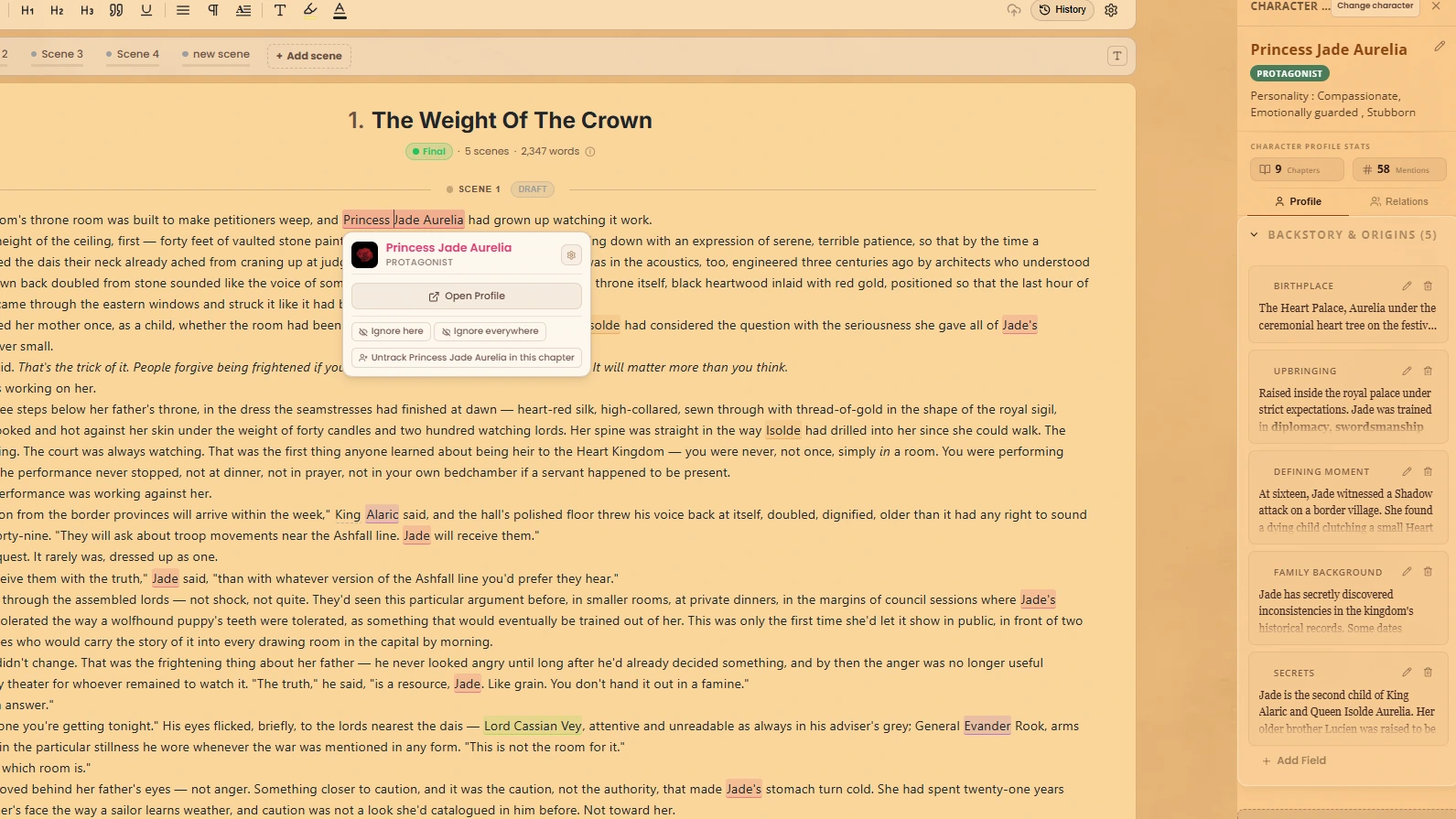
Imagine a single workspace built for writers, where:
Your characters live alongside your draft.
Your relationships are mapped, so you can see at a glance who connects to whom.
Your moodboards sit next to the scenes they inspire.
Your book design is part of the same project instead of a separate purchase.
Your progress is tracked right where you write.
All connected. All in one place.
That's WriteO.
And it answers the very first concern in this post: there's no AI in your writing process, and your manuscripts will never be used to train AI. That promise is stated plainly, with no fine print to decode.
How it maps to everything above
Scattered character docs become characters and relationships in one place.
Disconnected moodboards become moodboards inside your project.
A separate formatting tool becomes book design built into the workspace.
A blank-canvas productivity system becomes a workspace that's ready when you are.
Five apps become one.
You write. Everything else stays connected around you.
8. How to Simplify Your Own Setup
Even if you're not ready to switch tools, you can start reducing the chaos today. Try these steps:
List every app you currently use for writing. Seeing them all in one place is often a wake-up call.
Mark what each one actually does for you. If two apps do the same job, one can probably go.
Check the privacy policy of anything that touches your manuscript. Look for clear language about training and data use.
Notice where you lose time. Is it searching for notes, switching tabs, or fixing formatting? That's where consolidation will help most.Choose tools that connect. The fewer handoffs between apps, the fewer things fall through the cracks.
You don't need a perfect system. You need one that gets out of your way.
Final Thoughts
The best writing tool is the one that disappears. It holds your story, protects your work, and lets you focus on the sentences that matter.
Before you add another app to your stack, ask yourself three questions:
Do I trust what this app does with my manuscript?
Does it connect to the rest of my story, or does it sit on an island?
Will I spend more time setting it up than using it?
If those answers worry you, it might be time to simplify.
Your characters, plots, worlds, and progress deserve to live together. Your writing process should too.
Frequently Asked Questions
QCan I write a whole novel in Google Docs?
You can, and plenty of writers do. It handles the typing well. What it doesn't do is keep your characters, plot and planning connected to the draft, so that part ends up in other files. More on that here.
QDo writing apps use your manuscript to train AI?
Some do, or reserve the right to in their terms. Read the privacy policy before you paste anything in. If it doesn't clearly say your work won't be used for training, assume it might.
QIs Notion good for writing a novel?
QHow many apps do I need to write a novel?
Fewer than you think. If one tool covers your draft, characters, planning and formatting, you don't need the other four. If you're looking around, here are five Scrivener alternatives worth comparing.